THE IT IDEAS

  • Home

Wednesday, 24 April 2013

How to Surf Privately in Google Chrome

 THE IT IDEAS     11:02     private browsing   

First open the Google Chrome 
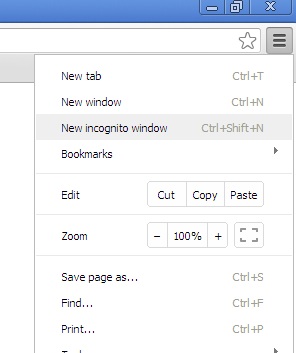
Click on Customize and Control Google Chrome at Right hand top as below


Now Click on New incognito Windows or press Ctrl + Shift + N, when you click on this option it will open another INCOGNITO MODE windows like below now you can surf safely without record any Websites that collect or share information about you, Internet service providers or employers that track the pages you visit , malicious software that tracks your keystrokes in exchange for free smileys,Surveillance by secret agents.


 Its done Enjoy !!!!! :)
Read More
  • Share This:  
  •  Facebook
  •  Twitter
  •  Google+
  •  Stumble
  •  Digg
Newer Posts Older Posts Home

Like Us !!!

Recent Posts

Blog Archive

  • ►  2016 (1)
    • ►  April (1)
  • ►  2015 (12)
    • ►  August (1)
    • ►  May (2)
    • ►  April (8)
    • ►  March (1)
  • ►  2014 (23)
    • ►  December (8)
    • ►  November (12)
    • ►  April (2)
    • ►  March (1)
  • ▼  2013 (7)
    • ►  December (1)
    • ▼  April (1)
      • How to Surf Privately in Google Chrome
    • ►  March (1)
    • ►  February (1)
    • ►  January (3)
  • ►  2012 (15)
    • ►  December (6)
    • ►  November (9)

Categories

apache2 EC2 error mysql php ubuntu aws aws rds browser github installation linux mount s3 AWS Bucket CentOS Computer DocumentRoot change How to Benchmarking Webserver IP LAMP Restart Computer SCP command SQL SERVER XRDP administrator amazon rds backup basic commands chat command line disable download drupal ec2.chroot environment external storage device fstab functions geoip gmail google home page iis instance internet java mod rewrite mongodb multiple login network password one password php5 php5-fpm php7 private browsing python repair filesystem repo reset password rhel sa password same computer script sftp share skype ssh tomcat ubuntu 16.04 ubuntu16 visudo windows 8 youtube
JobsMagBlogJobsMag.InThingsGuide

Popular Posts

  • How to Install PHP 7.0, Apache 2.4.18, & MySQL 5.7 on Ubuntu 16.04 LTS
    Update your repo list with below command $ sudo apt-get update -- > Install Apache 2.4.18 $ sudo apt-get install apac...
  • How to Use Python ‘SimpleHTTPServer’ to Serve Files Instantly
    How to Use Python ‘SimpleHTTPServer’ to Serve Files Instantly first check is python available or not. #python –V If command return version...
  • How to install Oracle JAVA JDK with apt-get command
    Installing Oracle JAVA JDK Run below command to one by one to install JAVA JDK. #apt-get install python-software-properties #add-apt-r...

Copyright © THE IT IDEAS | Powered by Blogger