
Trying to install SQL Server 2008 fails at the Setup
Support Rules page on the Rule "Restart Computer". The following error message
appear on screen: "Restart computer failed".

general this error is occurred when, a previous program installation created pending file operations on the installation machine. In our case, we found that successive attempts to complete a group policy installation of a Lexmark printer software was originating the problem. To Solve this issue Start below mentioned steps :- Click Start - > open Run and write 'regedit' to open registry editor After that Open HKEY_LOCAL_MACHINE\SYSTEM\CurrentControlSet\Control\Session Manager  Double click "PendingFileRenameOperations" and Delete everything in Value data box and save  Press OK and close the registry. Try now to run SQL Server 2008 setup.  |
Wednesday, 5 December 2012
Keep up to date your Computer
Get started fast by shortening your boot.
Stay up-to-date with silent app updates.
Know more about hardware issues before they cause problems.
For keep up to date our system we have one free software available in market SOLUTO
Sign up in soluto website and Download.

after download complete it will start to analysis about our computer to keep up to date and suggest to keep it perfect.


and open webpage to see the full Detail of our computer as well as another computers if you add another computer.


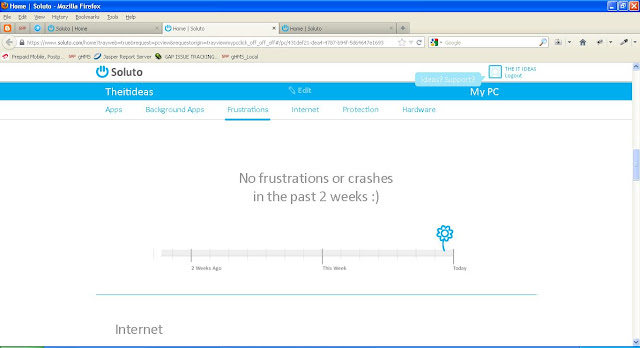
Below Mentioned Screen shot is about crashes happens before.
Below Mentioned Screen shot indicate all hardware configuration

Below Mentioned Screen shot showing your hardware and windows details.

If your computer have unnecessary plugin like babylon or another malware so, it will indicate you to remove to keep safe from Internet

Below Mentioned Screen shot is having all details about protection in user PC.

Below Mentioned Screen shot indicate user to update Firefox and java plugin to keep to date.

Now your computer is up to date
Its done Enjoy !!!!! :)
Stay up-to-date with silent app updates.
Know more about hardware issues before they cause problems.
For keep up to date our system we have one free software available in market SOLUTO
Sign up in soluto website and Download.
after download complete it will start to analysis about our computer to keep up to date and suggest to keep it perfect.

and open webpage to see the full Detail of our computer as well as another computers if you add another computer.

Below Mentioned Screen shot is about all application which is installed in user pc.

Below Mentioned Screen shot is about crashes happens before.

Below Mentioned Screen shot indicate all hardware configuration

Below Mentioned Screen shot showing your hardware and windows details.

If your computer have unnecessary plugin like babylon or another malware so, it will indicate you to remove to keep safe from Internet

Below Mentioned Screen shot is having all details about protection in user PC.

Below Mentioned Screen shot indicate user to update Firefox and java plugin to keep to date.

Now your computer is up to date
Its done Enjoy !!!!! :)

